
I started with a deliberately broad brief: business owners are beginning to let AI agents act on their behalf, but they don't trust them. "Improve trust in AI agents" is the kind of brief that invites you to design something generic, a dashboard of everything the agent did, or an approval button on every action. I wanted to practise the opposite: narrowing a vague, high-altitude brief down to one owner, one job, and one moment where trust is actually won or lost. I also chose it because agents acting for people is where AI products are heading, and how people supervise them without doing the work themselves is still an open design problem.
For a small bakery or florist, a supplier delay often arrives as a hint, "might be tight this week," buried in a WhatsApp thread or email only the owner sees. By the time it's understood, a client finds out at pick-up, and one late delivery becomes several failed orders and regulars who don't return.
An AI agent could catch those hints, but every message it sends is written in the owner's name. An agent that gets it wrong makes things worse, and one the owner must check message by message saves nothing. The design problem sits between those two failures.
I began by mapping the owner's real interactions before any app existed: suppliers, clients, staff, couriers, and payment providers, and what goes wrong between them today. Two things stood out. Supplier problems cascade, from a hinted delay to missing stock, an order that isn't ready, a courier to reschedule, and a client who may never be told. And almost every piece of information passes through the owner, so when they miss a signal, nobody downstream gets it.
Decision 1:Scope
The owners mentioned changes to client purchases, rescheduled shipments, and unpaid invoices. These couldn't be all handled within one brief due to varied nature of all processes. Usually, I'd look at business strategy, support tickets and churn moments to identify which pain is worth solving. Here, I focused on frequency (how often the owner does the job), cost of the mistake, and access to evidence and pain.
Decision
I prioritised missed supplier warnings over payment issues, because payment mismatches are usually settled face to face at the counter, while a supplier hint that only the owner sees can sit for hours as stock is used and clients go uninformed, turning one late delivery into several failed orders.
Decision 2: Segment
Small businesses vary in how they operate, so I decided to narrow down the type of business by their operations. I mapped out one business in depth (baker) and checked the map against other businesses - if their operations match, then my segment holds.
Decision
After the mapping exercise, I defined my segment as owner-run businesses with perishable stock and frequent supplier orders. This leaves out service-based, appointment-driven, with few suppliers while maintaining path to expand to similar businesses later.

Decision 3: Branching
After running 5 Whys, it became clear that there are 2 reasons why the client isn't informed about the change or find out at the pick up.
Decision
I focused on the first branch: owners mostly miss the warning rather than notice it and hold back, and they can't act on a warning they never saw.
The second became an assumption to test: once owners know an order is affected, they act on it.
The owner doesn't know the order is affected
Root: There's no automatic way to understand if and how delayed orders affect client purchases, and the owner holds most of it in their head
The owner does know the order might be affected, but doesn't tell the client.
Root: acting on an uncertain signal has an immediate cost (time, an awkward conversation, cancellation risk), while waiting has a delayed one, so owners wait.
My problem statement described the owner's reality without an agent, but the brief assumed one. Instead of picking a side, I wrote two How-Might-We questions: one for the underlying need, one for supervising the agent that would meet it.
The need
HMW help the owner connect a supplier's hint to the specific orders it puts at risk, while there's still time to act?
Supervising the agent
HMW help the owner stay in control of which supplier warnings the agent acts on, and what it tells clients, without having to check every message themselves?
Decision 4: Connecting warnings to orders
I generated around 28 ideas, grouped them by the assumption each one relied on, and scored each cluster on four criteria: does it work when the warning is vague, without a full stock database, before the last useful moment, and when the owner isn't available?
Full-stock remodelling
Requires continuous and exact stock monitoring
Becomes a full-time job for an already busy owner and team members
Routine stock check-in
Help control the stock count, doesn't connect warnings to orders
Doesn't work with full stock database
Light-weight dependency map
Doesn't require full-time supervision from the owner
Quantities can be modelled from supplier orders & invoices
Signal clearer at the source
Helps clarify vague messages from suppliers - helps with vagueness
Light dependency map helps estimate the impact on the client purchases
Decision 5: Keeping the owner in control
I scored the supervision clusters on whether the owner decides what goes out without review, stays in control without checking every message, can catch mistakes before they reach a client, and whether the agent hands over when unsure.
Batch approval
Gives full control, but costs the owner the same attention the agent was meant to save.
Doesn't save any time and becomes a full time job
The only capability the AI has is text generation
Calibration upfront
Allows the owner to define what they are comfortable with sending
Model gets to understand the owner's tone of voice and preferences
Review by exception
Keeps the owner in control if message falls out of agreed rules
Doesn't require every message to be reviewed
Decision 6: Escalations share one layout
I've identified 3 reasons as to why to agent might need the owner (mistake, unsure, outside of rules). Every case that needs the owner follows the same structure: what happened, why they're seeing it, the options, and "I'll take over" always in the same place. Only the core content changes with the reason, so the owner never has to relearn the screen.

The agent admitting a mistake
It reads naturally, but owners can only pick from actions the system already offers, so a rule nobody predicted has nowhere to go. And the free-text conditions it did allow had no check that the agent understood them.

Reply suggests a mistake
The screen leads with the client's own words, then shows what the agent originally sent, so the owner can judge what actually happened. The agent says only what it knows, that it paused because the reply suggests an error, which keeps the owner's judgement in charge.
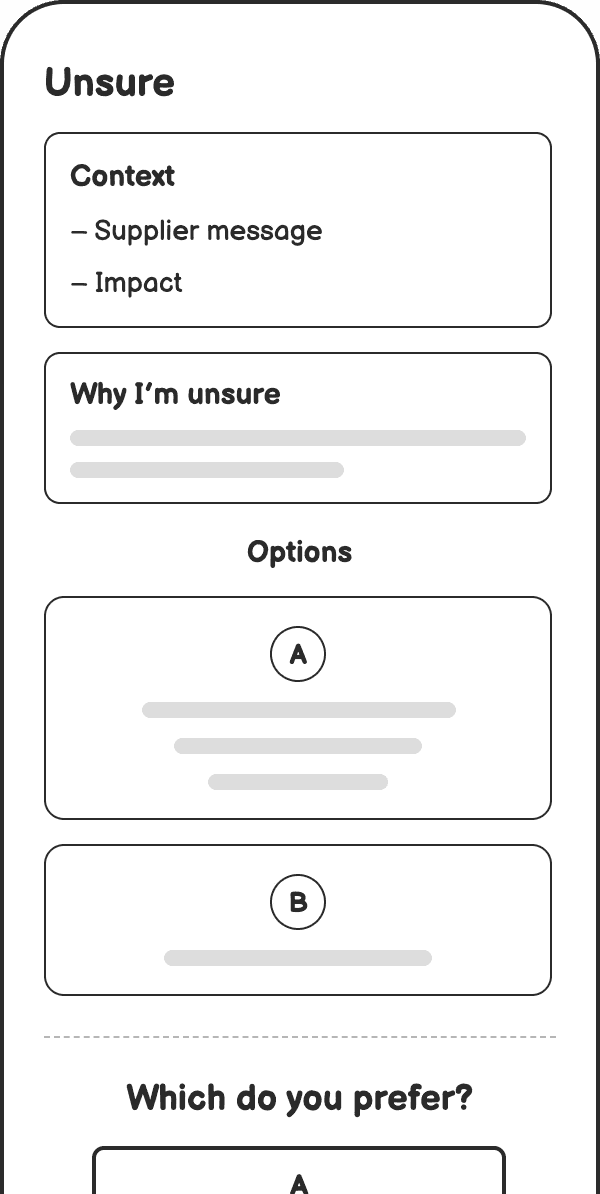
Agent is unsure
The agent names exactly what it doesn't know, such as "the supplier didn't give a date," rather than a general "I'm not sure." Specific uncertainty lets the owner decide quickly, and one option is always to find out more, like asking the supplier.
Decision 8: Rules in the owner's own words
The rules decide everything the agent may do alone, but owners aren't technical, and dropdowns or toggles would make them learn the system's logic instead of saying what they want.
Sentence builder with dropdowns
It reads naturally, but owners can only pick from actions the system already offers, so a rule nobody predicted has nowhere to go. And the free-text conditions it did allow had no check that the agent understood them.

Settings page of pre-written rules
It's precise and easy to scan, but it asks owners to translate what they want into the system's structure and terms. Like the sentence builder, it only covers rules the product team thought of in advance.

Describe the rule
Owners write a rule the way they'd brief a member of their team, such as "never offer a substitute for wedding orders without asking me." Nothing has to be learned first, and rules nobody predicted have somewhere to go.

Read back to the owner
The agent restates the rule in plain language, with an example of when it would apply, and the owner confirms or corrects it. A misread rule would otherwise fail, so this turns it into a visible check at the moment it's easy to fix.
User mental model: the agent as a team member
Owners already delegate to staff, so the design borrows that relationship rather than asking them to learn a system. They brief the agent in their own words, the way they'd brief an employee. The agent speaks in the first person ("I paused because..."). It handles routine work alone and only comes to the owner with what needs them, like a trusted colleague would. And the owner can always say "I'll take over."
Governors: keeping the owner in charge
Sample response
Lightweight outputs generated before AI commits to. a full result. In this case applied in the rules section, when the user is asked "Is this what you meant?"

Action plan
Structured plans that require confirmation when the agent is unsure or the case fall outside of the agreed rules

Trust builders: making the agent's work visible
Footprints
The pattern lets users trace the AI's steps from prompt to result. Here, thanks to the "Handled by the agent" log, the owner can check what was done alone, whenever they choose.

Caveat
The uncertainty screen applies this at the level of a single case: the agent names exactly what it doesn't know, rather than a general disclaimer.

Initial flows developed
Clear warning, outside the rules. The butter delivery moves to Thursday, three orders are flagged, and the agent drafts a client message that needs approval. The owner approves, and the case moves to the handled log. This shows the supervision model.
Vague hint, agent unsure. “Might be tight on flour this week.” The agent names what it doesn’t know and offers to ask the supplier. This shows the uncertainty screen.
Adding a rule. The owner writes “Never offer a substitute for wedding orders without asking me,” and the agent reads it back with an example. This shows the rules decision.
Next steps
Chat feature
Evaluation framework for AI suggestions
UI improvements
Figma Make is more accurate when it comes to design detail, even if it wasn't included in the instructions but is good design practice (for example, supporting text or tags)
Some functionality is built automatically. For example, I asked to add Edit button but didn't specify the functionality needs to exist. Figma built it anyways, which allowed me to test Edit message in the same round.
Building an end-to-end prototype for testing, one that we might want to share with external teams - less buggy than Figma Make
Less attention to detail from the pasted frames. Lovable ignored adding the Edit button.
Ignored some instructions from the prompt. I asked to order the client purchases by risk, which wasn't done. Also, the Home Page design resembled web design, and the prompt specified mobile design.